
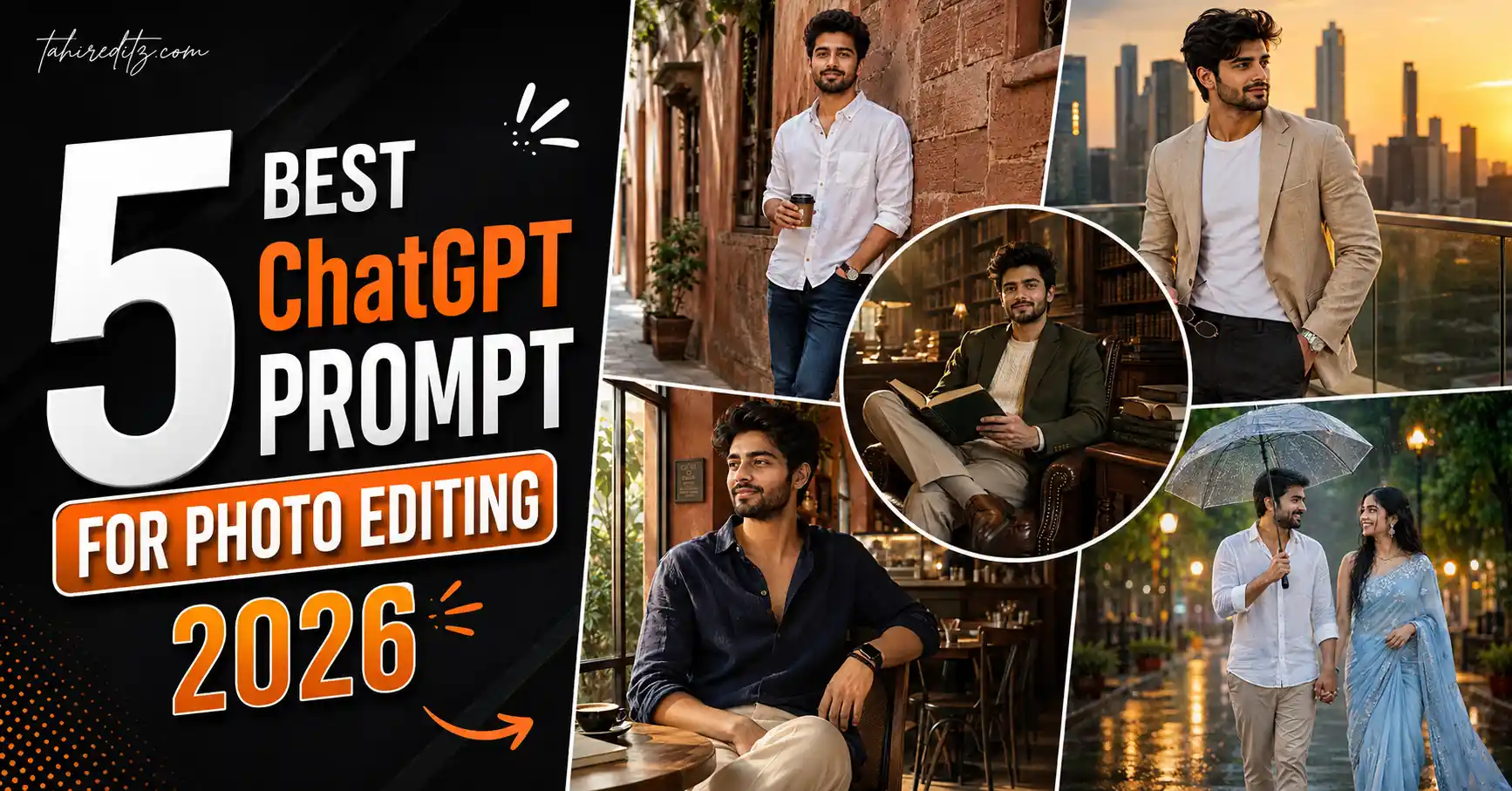
AI photo editing has improved faster than anyone expected. In 2026, you no longer need expensive editing software or professional Photoshop skills to create stunning portraits. With a detailed ChatGPT Prompt for Photo Editing, you can transform an ordinary photo into a premium fashion portrait, cinematic lifestyle image, luxury editorial photograph, or realistic travel picture in just a few seconds.
Whether you’re creating content for Instagram, Facebook, Pinterest, LinkedIn, or your personal portfolio, the quality of your prompt matters just as much as the photo you upload. A simple prompt often produces average results, while a well-written prompt gives the AI clear instructions about lighting, clothing, composition, camera settings, background, and facial identity.
One of the biggest improvements in modern AI image generation is identity preservation. The latest ChatGPT image model and other AI tools can now keep your facial structure, hairstyle, skin tone, expression, and natural appearance remarkably accurate while placing you inside completely different environments. That’s why creators are now producing magazine-quality images without booking expensive photoshoots.

If you’re looking for the best ChatGPT prompt for photo editing, you’re in the right place. This guide includes five detailed prompts that work beautifully with ChatGPT, Gemini AI, Flux AI, Midjourney, Leonardo AI, and Adobe Firefly.
A ChatGPT Prompt for Photo Editing is a detailed instruction that tells AI exactly how to edit your uploaded photo while preserving your face. By describing the lighting, background, clothing, camera settings, mood, composition, and style, you can generate realistic DSLR-quality portraits that look professionally photographed.
Why ChatGPT Photo Editing Prompts Are Trending in 2026
AI-generated portraits have become one of the biggest social media trends because they look surprisingly realistic. Instead of using heavy beauty filters, people now prefer AI-generated images that preserve their natural identity while improving the overall composition and lighting.
Unlike traditional editing apps, ChatGPT understands detailed natural language. That means you can describe an entire photoshoot using simple English. From the camera angle to the clothing texture, almost every detail can be controlled through the prompt.
 Trending ChatGPT Photo Prompts 2026
Another reason these prompts have become popular is consistency. Once you create a prompt that works well, you can reuse it with different photos or backgrounds while maintaining the same premium style.
Professional photographers are also using AI prompts to create mood boards, preview photoshoot concepts, and experiment with different lighting setups before the actual shoot. Fashion creators, influencers, bloggers, and digital artists now rely on detailed prompts to save time and explore new creative ideas.
Modern AI image models can realistically recreate:
- Luxury editorial portraits
- DSLR-quality photography
- Professional lighting setups
- Natural skin texture
- Premium Lightroom color grading
- Shallow depth of field
- Magazine-style compositions
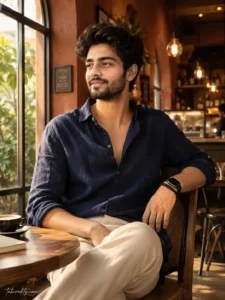
Prompt 1: Luxury Café Editorial Portrait
This prompt creates a warm lifestyle portrait inside a stylish café with premium editorial lighting while preserving every facial detail from your uploaded photo.
Use the uploaded image as the exact identity reference and preserve 100% facial structure, skin tone, eye shape, beard, hairstyle, facial proportions, natural expression, and every recognizable facial detail without altering the person’s appearance. Create an ultra-realistic lifestyle portrait inside a modern premium café during a warm afternoon. The subject sits comfortably at a small wooden table beside a large elegant arched window while soft golden sunlight gently wraps around the face from the left. Dress the subject in an oversized deep navy linen shirt with the top two buttons casually open and sleeves rolled naturally to the forearms, paired with clean straight-fit cream trousers. Add a black smartwatch and two matte black beaded bracelets. Keep the hairstyle naturally textured with a soft relaxed wave. Use Canon EOS R6 DSLR photography, RF 50mm f/1.4 lens, warm café bokeh with terracotta interiors and glowing Edison bulbs, cinematic honey color grading, realistic skin pores, subtle film grain, shallow depth of field, luxury fashion editorial styling, HDR lighting, masterpiece quality, ultra-detailed 8K resolution, vertical 3:4 composition. Add a small elegant watermark reading “tahireditz.com” in the bottom-left corner using a thin handwritten signature style.
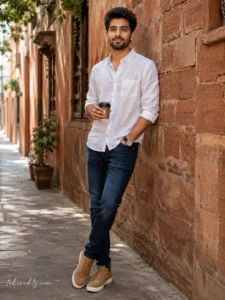
Prompt 2: Cinematic Brick Wall Lifestyle Portrait
If you prefer clean outdoor portraits with natural lighting, this prompt creates a timeless fashion image inspired by premium lifestyle magazines.
Use the uploaded image as the exact identity reference and preserve 100% facial structure, hairstyle, skin tone, eye shape, beard, facial proportions, expression, and every natural facial detail without changing any recognizable feature. Create an ultra-realistic outdoor lifestyle portrait of a handsome young Indian man standing naturally beside a textured terracotta brick wall inside a peaceful narrow alley. The subject casually shifts weight onto one leg, keeps the left hand inside the pocket, and holds a closed coffee cup naturally in the right hand while looking directly toward the camera with a soft relaxed smile. Dress the subject in a crisp white linen button-down shirt with sleeves folded neatly to the forearm, dark indigo slim-fit jeans, and premium tan suede sneakers. Natural daylight enters softly from the left, creating beautiful highlights along the face and shoulders while preserving realistic skin texture and visible pores. Capture using iPhone RAW photography style combined with Canon EOS R6 realism, 50mm f/2 lens, subtle digital grain, cinematic lifestyle color grading, shallow depth of field, luxury editorial fashion photography, HDR rendering, masterpiece quality, ultra-detailed 8K resolution, vertical 3:4 composition. Add a small elegant watermark reading “tahireditz.com” in the bottom-left corner using a refined handwritten signature style.
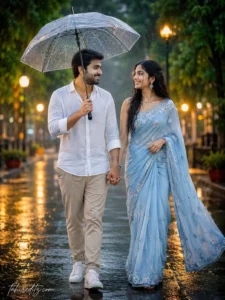
Prompt 3: Happy Couple with Open Umbrella
This prompt creates a romantic rainy-day portrait with natural emotions, cinematic lighting, and premium lifestyle photography that looks perfect for social media.
Use the uploaded image(s) as the exact identity reference and preserve 100% facial structure, hairstyles, skin tones, facial features, body proportions, expressions, and natural appearance without changing any recognizable detail. Create an ultra-realistic romantic monsoon portrait of a happy young couple walking together beneath a large transparent umbrella during a gentle rainfall. The couple naturally holds hands while smiling warmly at each other, capturing an authentic candid moment filled with love and happiness. Dress the man in a premium white linen shirt with beige tailored trousers and clean white sneakers. Dress the woman in a flowing pastel blue saree with elegant silver embroidery, delicate jewelry, and softly moving hair. Surround them with rain-soaked streets, lush green trees, glowing street lamps, reflective puddles, drifting mist, and beautiful cinematic bokeh lights. Add realistic raindrops on the umbrella, damp clothing textures, wet hair strands, Canon EOS R5 DSLR photography, RF 85mm f/1.2 lens, HDR lighting, Lightroom-style color grading, shallow depth of field, photorealistic rendering, masterpiece quality, ultra-detailed 8K resolution, vertical 3:4 composition. Add a small elegant watermark reading “tahireditz.com” in the bottom-left corner using a refined handwritten signature style.
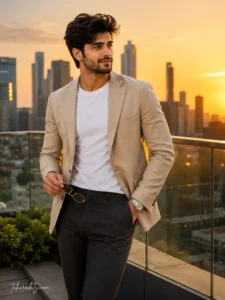
Prompt 4: Luxury Rooftop Sunset Portrait
If you love premium fashion photography with city views, this prompt creates a luxury rooftop portrait during golden hour with beautiful cinematic lighting.
Use the uploaded image as the exact identity reference and preserve 100% facial structure, hairstyle, skin tone, facial features, body proportions, expression, and natural appearance without altering any recognizable detail. Create an ultra-realistic luxury rooftop portrait captured during golden hour overlooking a modern city skyline. The subject stands naturally beside a sleek glass railing wearing a premium beige linen blazer over a fitted white crew-neck T-shirt, tailored charcoal trousers, luxury leather loafers, a classic silver wristwatch, and stylish sunglasses held casually in one hand. Warm sunset light wraps beautifully around the face while the distant skyline glows with soft orange and golden reflections. Canon EOS R6 DSLR photography, RF 85mm f/1.2 lens, realistic skin texture, subtle wind movement in the clothing, shallow depth of field, cinematic HDR lighting, premium editorial color grading, luxury fashion campaign styling, masterpiece quality, ultra-detailed 8K resolution, vertical 3:4 composition. Add a small elegant watermark reading “tahireditz.com” in the bottom-left corner using a refined handwritten signature style.
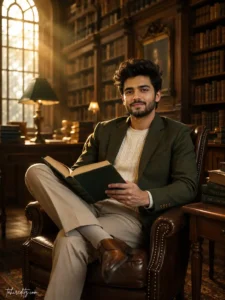
Prompt 5: Elegant Library Editorial Portrait
This prompt is perfect for creating a sophisticated portrait with a calm academic atmosphere and timeless magazine-style composition.
Use the uploaded image as the exact identity reference and preserve 100% facial structure, hairstyle, skin tone, facial features, body proportions, expression, and natural appearance without changing any recognizable detail. Create an ultra-realistic editorial portrait inside a luxurious classic library filled with tall wooden bookshelves, vintage books, warm ambient lighting, and elegant reading tables. The subject sits comfortably in a premium leather chair holding an open hardcover book while looking calmly toward the camera with a confident natural smile. Dress the subject in a premium olive-green blazer layered over a cream knit sweater with tailored beige trousers and polished brown leather shoes. Warm sunlight enters softly through large arched windows, creating cinematic light rays, realistic shadows, rich wood textures, and premium editorial depth. Canon EOS R6 DSLR photography, RF 50mm f/1.4 lens, realistic skin pores, shallow depth of field, cinematic color grading, luxury magazine styling, HDR rendering, masterpiece quality, ultra-detailed 8K resolution, vertical 3:4 composition. Add a small elegant watermark reading “tahireditz.com” in the bottom-left corner using a refined handwritten signature style.
Tips for Better AI Photo Editing Results
Always upload the highest-quality reference photo you have. Clear facial details help AI preserve your identity much more accurately. Avoid heavy filters, low-resolution images, or extreme camera angles.
Describe every important detail inside your prompt, including lighting, clothing, background, mood, camera settings, and composition. Detailed prompts consistently produce more realistic results than short prompts.
If you’re creating editorial portraits, use professional camera settings such as Canon EOS R6 or Sony A1 with portrait lenses between 50mm and 85mm. Combined with shallow depth of field and Lightroom-style color grading, these details help AI generate realistic DSLR-quality photographs.
Finally, keep the composition clean. Simple backgrounds, balanced lighting, realistic skin texture, and natural expressions almost always outperform overly dramatic effects. Premium-looking AI portraits rely on realism rather than excessive editing.
How to Get Better Results with ChatGPT Photo Editing Prompts
The quality of your AI-generated image depends heavily on the reference photo you upload. Always choose a clear, high-resolution image where your face is fully visible, the lighting is balanced, and your natural expression can be seen easily. Modern AI models preserve facial identity much more accurately when the original image contains sharp details and realistic lighting.
Instead of writing very short prompts, describe every important detail. Mention the clothing, background, camera angle, lighting direction, mood, composition, camera settings, and color grading. Detailed prompts help ChatGPT understand exactly what you want and produce much more realistic results.
Lighting is one of the biggest reasons professional AI portraits look realistic. Soft window light, golden-hour sunlight, premium studio lighting, or warm café lighting creates beautiful shadows and natural skin tones. Avoid extremely bright or unrealistic lighting if your goal is DSLR-quality images.
Professional camera settings also improve the final output. Mentioning cameras such as the Canon EOS R6, Canon EOS R5, Sony A1, or Nikon Z9 together with portrait lenses like a 50mm f/1.4 or 85mm f/1.2 helps AI recreate realistic background blur, lens compression, and premium photographic depth.
Don’t overlook color grading. Lightroom-inspired editing with balanced highlights, natural shadows, realistic skin tones, and subtle film grain creates images that resemble high-end magazine photography. Small improvements in color often make a much bigger difference than adding excessive visual effects.
Finally, keep your prompts focused on a single concept. Whether it’s a luxury café portrait, a fashion editorial, a romantic rainy scene, or a rooftop lifestyle photo, a clear creative direction helps AI generate cleaner, more realistic images.
Best AI Tools for ChatGPT Photo Editing
- ChatGPT Image Generator
- Gemini AI
- Midjourney
- Leonardo AI
- Flux AI
- Adobe Firefly
Frequently Asked Questions
Can ChatGPT edit photos with realistic results?
Yes. The latest ChatGPT image generation models can create highly realistic photo edits while preserving facial identity, natural skin texture, lighting, and composition when given a detailed prompt and a clear reference image.
What makes a ChatGPT photo editing prompt better?
A good prompt clearly explains the subject, clothing, location, lighting, camera settings, composition, mood, and style. Including identity-preservation instructions also helps keep facial features accurate.
Do these prompts work with other AI image generators?
Yes. Although these prompts are written for ChatGPT, they also work well with Gemini AI, Midjourney, Leonardo AI, Flux AI, and Adobe Firefly. You may only need to make small adjustments depending on the platform.
How can I make AI-generated portraits look like professional DSLR photos?
Use a high-quality reference image, include realistic camera settings, describe soft natural lighting, preserve skin texture, use Lightroom-style color grading, and avoid excessive beauty filters. These details help AI generate portraits that closely resemble real professional photography.
Final Thoughts
The ChatGPT Prompt for Photo Editing is one of the easiest ways to create premium-quality AI portraits in 2026. With a detailed prompt, a clear reference image, and the latest AI image models, you can generate luxury café portraits, cinematic outdoor photos, romantic couple scenes, rooftop fashion images, and elegant editorial photography while keeping your natural identity intact. The prompts shared in this guide are designed to save time, improve realism, and help you create social media-ready images that look professionally photographed. Feel free to customize the outfits, locations, lighting, and colors to match your own creative style while keeping the identity-preservation instructions unchanged for the best possible results.