
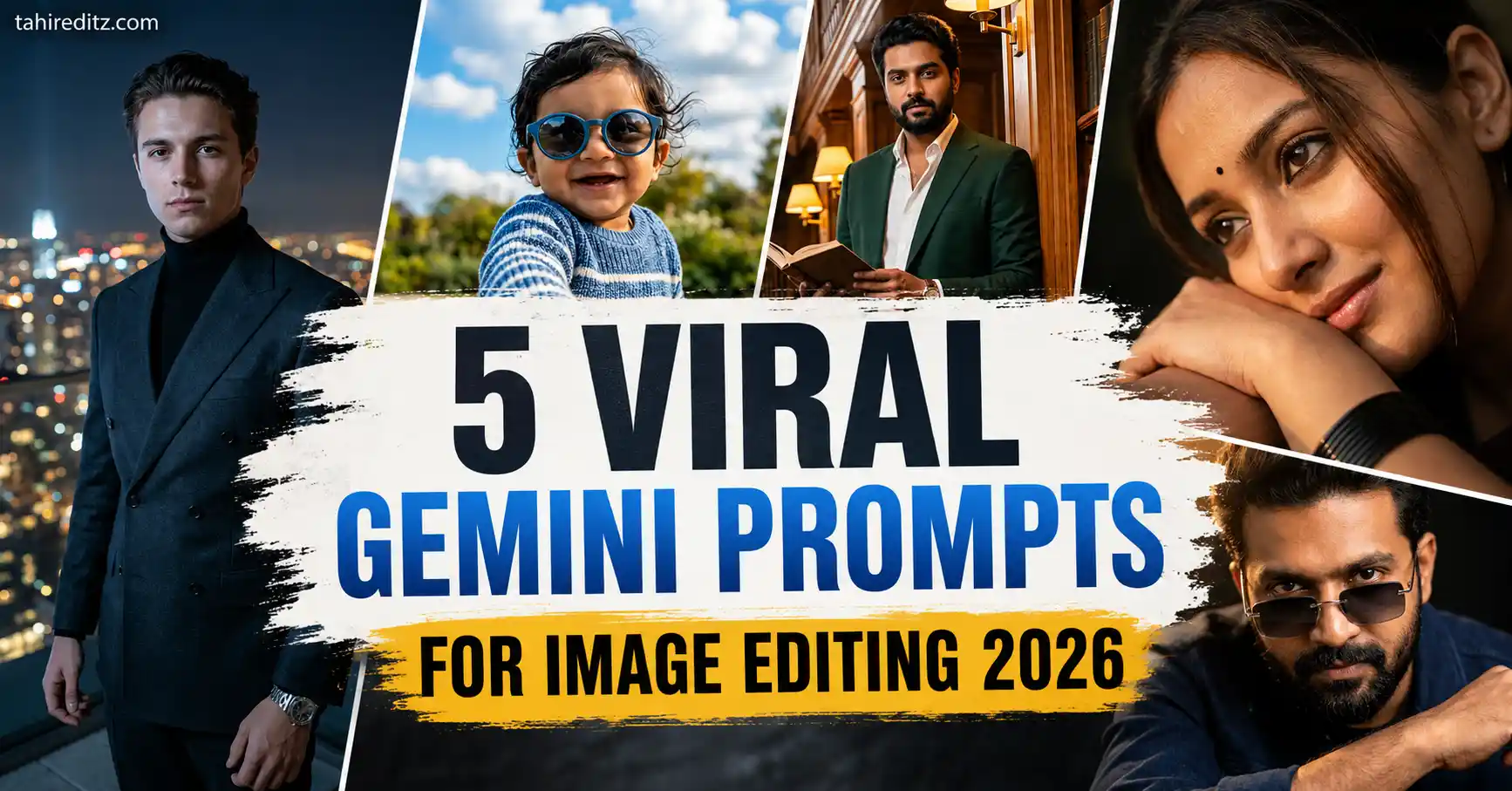
AI image editing has improved dramatically over the last year. Instead of creating artificial-looking photos, modern AI models like Google Gemini and ChatGPT Image Generator can now preserve facial identity, maintain realistic skin texture, understand premium lighting, and generate professional DSLR-quality edits with incredible accuracy.
Whether you want a luxury fashion portrait, a cinematic close-up, a lifestyle photograph, or a realistic social media edit, the quality of your final image depends almost entirely on the prompt you use. A well-written prompt tells the AI exactly how to preserve facial identity while improving lighting, composition, clothing, background, camera settings, and overall realism.

If you’re searching for the best Gemini Prompts for Image Editing 2026, you’ve come to the right place. This guide includes five premium prompts designed for ChatGPT Image Generator, Google Gemini, Flux AI, Midjourney, Leonardo AI, and other advanced AI image generators.
Every prompt below follows modern AI prompting techniques used by professional creators. They focus on natural skin texture, realistic lighting, DSLR-quality rendering, premium editorial color grading, and complete facial identity preservation.
Quick Answer
The best Gemini prompts for image editing preserve your facial identity while improving lighting, clothing, composition, camera quality, and overall realism. Detailed prompts that include DSLR camera settings, HDR lighting, realistic skin texture, shallow depth of field, and premium color grading consistently produce the most realistic AI-edited photos in 2026.
Why Gemini Image Editing Prompts Are Trending in 2026
Google Gemini has become one of the most powerful AI image editing tools available today. Unlike earlier AI generators that often changed facial features or created unrealistic textures, Gemini now understands long, detailed prompts with impressive accuracy. It can preserve facial identity while applying professional-level edits that closely resemble real photography.
 Motu Patlu Funny AI Video Prompt and Image Prompt (2026)
Another reason these prompts are becoming so popular is their versatility. Instead of editing only backgrounds or colors, users can completely transform an ordinary photo into a luxury editorial portrait while keeping the person’s identity untouched. Fashion creators, influencers, photographers, bloggers, and social media users are all using detailed Gemini prompts to create premium-quality images without expensive editing software.
The most realistic AI-edited portraits usually include professional photography terminology such as DSLR camera models, portrait lenses, HDR rendering, realistic skin texture, cinematic lighting, shallow depth of field, and Lightroom-style color grading. These details help Gemini generate images that feel natural rather than artificially enhanced.
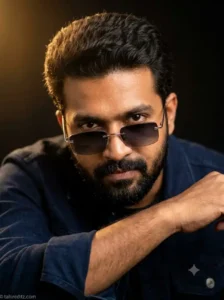
Prompt 1: Luxury Cinematic Fashion Portrait
 5 Best Gemini Tahir Editz Prompts for boys 2026
This prompt creates a premium studio-quality editorial portrait with dramatic lighting while preserving every facial detail exactly as it appears in the uploaded image.
Use the uploaded reference image as the exact identity reference and preserve 100% facial structure, face shape, skin tone, hairstyle, hair texture, eyebrows, eyes, nose, lips, jawline, beard or mustache (if present), facial proportions, natural expression, age, and every recognizable facial feature without changing the person’s identity.
Create an ultra-realistic cinematic close-up portrait of the same person leaning slightly forward with one arm resting naturally in the foreground. The subject looks directly into the camera with an intense yet confident expression.
Dress the subject in a premium dark navy blue denim jacket layered over a matching dark shirt. Add stylish rimless rectangular sunglasses featuring thin silver metal frames and elegant black gradient lenses positioned slightly lower on the nose so the eyes remain clearly visible above the glasses.
Style the hair with thick natural volume, realistic texture, and soft individual strands. Illuminate the portrait using a warm golden key light from the upper-left, creating soft highlights across the face and hair while maintaining subtle cinematic shadows on the opposite side.
Place the subject against a deep black studio background with a smooth natural falloff and no distractions. Use an extremely shallow depth of field with razor-sharp focus on the eyes while allowing the edges of the frame to fade into soft creamy bokeh.
Capture the portrait using an 85mm portrait lens at f/1.4 aperture with HDR photography, realistic RAW skin texture, premium Lightroom editorial color grading, ultra-photorealistic rendering, luxury fashion photography style, masterpiece quality, and ultra-detailed 8K DSLR resolution.
Negative Prompt: blurry image, low quality, cartoon, anime, CGI, illustration, painting, oversaturated colors, unrealistic skin, soft face, identity change, different hairstyle, different beard, extra fingers, deformed hands, distorted anatomy, duplicate face, watermark, logo, text, cropped head, underexposed, overexposed.
Add a small elegant watermark reading “tahireditz.com” in the bottom-left corner.

Prompt 2: Joyful Outdoor Baby Portrait
This adorable prompt creates an emotional childhood portrait with vibrant natural colors, realistic skin texture, and premium DSLR photography.
5 Best Gemini Tahir Editz Prompts for boys 2026
Create an ultra-realistic 8K vertical portrait of a cheerful South Asian baby boy captured from a low-angle perspective as he reaches one tiny hand naturally toward the camera.
The baby has bright expressive eyes, a joyful smile, soft wavy black hair moving gently in the breeze, and wears stylish round blue sunglasses. Dress him in a cozy blue-and-white striped knitted sweater paired with elegant white pants.
The background features a beautiful bright blue sky filled with fluffy textured clouds under warm natural sunlight. Surround the scene with soft greenery and subtle outdoor bokeh to create a peaceful family photography atmosphere.
Capture the portrait using a Canon EOS R5 DSLR with an RF 85mm f/1.2 portrait lens. Use shallow depth of field, realistic skin texture, natural baby expressions, vibrant yet balanced colors, HDR photography, premium Lightroom color grading, masterpiece quality, ultra-photorealistic rendering, and ultra-detailed 8K resolution in a vertical 9:16 composition.
Negative Prompt: blurry, low quality, extra fingers, deformed hands, duplicate limbs, distorted face, cropped head, watermark, logo, cartoon, CGI, artificial skin, excessive sharpening, motion blur, unrealistic lighting.
Add a small elegant watermark reading “tahireditz.com” in the bottom-left corner.
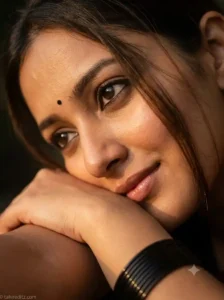
Prompt 3: Dramatic Golden Hour Close-Up Portrait
This premium close-up portrait is perfect for Instagram Reels, fashion pages, and cinematic profile photos. It emphasizes expressive eyes, natural emotions, and professional editorial photography.
Use the uploaded image as the exact identity reference and preserve 100% facial structure, eye shape, eyebrows, hairstyle, skin tone, lips, facial proportions, and every recognizable facial detail without changing the person’s identity.
Create an ultra-realistic extreme close-up cinematic portrait captured from a dramatic 45-degree side angle. The subject gently rests her cheek against her forearm while the lower lip softly touches the arm in a relaxed, emotional pose.
Maintain a soft natural smile with expressive kajal-lined eyes looking slightly upward and just away from the camera. Style the hair naturally loose with delicate strands softly falling across the face. Add a tiny black bindi, elegant black bangles near the face, glossy lips, and subtle natural makeup.
Illuminate the portrait using warm golden-hour side lighting that creates beautiful highlights across the skin while maintaining soft cinematic shadows and dreamy emotional depth. The background should remain dark and beautifully blurred with creamy bokeh.
Capture the image using a Canon EOS R5 DSLR paired with an 85mm f/1.8 portrait lens. Keep the eyes razor sharp while using shallow depth of field, realistic RAW skin texture, HDR photography, premium Lightroom cinematic color grading, masterpiece quality, ultra-photorealistic rendering, and ultra-detailed 8K resolution in a vertical composition.
Add a small elegant watermark reading “tahireditz.com” in the bottom-left corner.
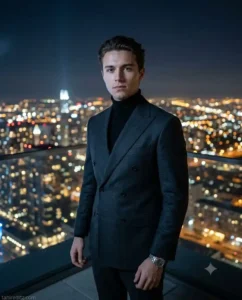
Prompt 4: Luxury Rooftop Night Skyline Editorial Portrait
This unique prompt creates a premium luxury editorial portrait overlooking a glowing city skyline at night. It combines cinematic lighting, elegant fashion styling, and ultra-realistic DSLR photography to produce an eye-catching AI image perfect for Instagram, portfolio photos, and personal branding.
Use the uploaded image as the exact identity reference and preserve 100% facial structure, face shape, skin tone, hairstyle, hair texture, eyebrows, eyes, nose, lips, jawline, beard or mustache (if present), facial proportions, natural expression, age, and every recognizable facial detail without changing the person’s identity.
Create an ultra-realistic 8K vertical luxury editorial portrait on the rooftop of a modern skyscraper overlooking a breathtaking city skyline at night. Thousands of glowing building lights, illuminated streets, luxury high-rise towers, and distant traffic create a rich cinematic background filled with depth and atmosphere.
Dress the subject in a premium charcoal double-breasted suit with subtle textured fabric, paired with a fitted black turtleneck, polished leather Chelsea boots, a luxury stainless-steel wristwatch, and minimalist silver accessories. Style the hair naturally with realistic texture while maintaining a calm, confident expression and direct eye contact with the camera.
Soft cool moonlight illuminates the left side of the face while warm city lights create beautiful rim lighting around the shoulders. The skyline behind remains softly blurred with creamy bokeh, creating a premium editorial magazine look.
Capture the portrait using a Sony A1 DSLR paired with a 50mm f/1.2 GM portrait lens. Use HDR photography, realistic RAW skin texture with visible pores, premium Lightroom cinematic color grading, shallow depth of field, masterpiece quality, ultra-photorealistic rendering, luxury fashion editorial styling, and ultra-detailed 8K resolution in a vertical 4:5 composition.
Negative Prompt: blurry, low resolution, cartoon, anime, CGI, unrealistic skin, over-sharpening, identity change, extra fingers, distorted anatomy, watermark, logo, text artifacts, duplicate face, poor lighting.
Add a small elegant watermark reading “tahireditz.com” in the bottom-left corner.
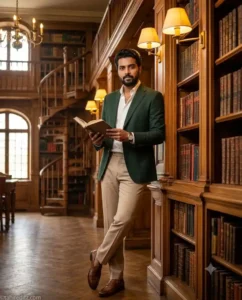
Prompt 5: Luxury Library Editorial Portrait
This premium concept is inspired by classic European libraries and modern luxury fashion photography. The combination of warm wooden interiors, dramatic lighting, and timeless styling creates a unique AI portrait that stands out from common social media edits.
Use the uploaded image as the exact identity reference and preserve 100% facial structure, face shape, skin tone, hairstyle, hair texture, eyebrows, eyes, nose, lips, jawline, beard or mustache (if present), facial proportions, natural expression, age, and every recognizable facial detail exactly as in the original image.
Create an ultra-realistic 8K vertical editorial portrait inside a magnificent vintage library filled with towering wooden bookshelves, elegant spiral staircases, antique chandeliers, leather-bound books, polished oak flooring, and warm ambient lighting.
Dress the subject in a sophisticated deep forest-green tailored blazer layered over a crisp white shirt with the top button open, paired with tailored beige trousers, polished brown leather loafers, and a luxury mechanical wristwatch. The subject casually leans against a polished wooden bookshelf while holding an open hardcover book, looking directly toward the camera with a calm, intelligent, and confident expression.
Warm golden reading lamps illuminate the face naturally while soft window light enters through tall arched library windows, creating beautiful highlights, realistic shadows, and cinematic depth. Floating dust particles catch the light, adding a timeless storytelling atmosphere.
Capture the portrait using a Canon EOS R5 DSLR paired with an RF 85mm f/1.2L portrait lens. Use shallow depth of field, realistic RAW skin texture with visible pores, HDR photography, premium Lightroom editorial color grading, masterpiece quality, luxury fashion photography, ultra-photorealistic rendering, and ultra-detailed 8K resolution in a vertical 4:5 composition.
Negative Prompt: blurry image, low quality, cartoon, anime, CGI, unrealistic skin, excessive smoothing, extra fingers, distorted face, duplicate limbs, watermark, logo, text artifacts, poor anatomy, overexposed lighting.
Add a small elegant watermark reading “tahireditz.com” in the bottom-left corner.
Tips for Better AI Image Editing Results
The quality of your AI-edited photo depends more on the prompt than the AI model itself. Start with a sharp reference image where your face is clearly visible and naturally lit. This allows Gemini and ChatGPT to preserve your identity more accurately.
Include detailed instructions about lighting, clothing, background, camera angle, lens, facial expression, and overall mood. Professional photography terms such as Canon EOS R5, Sony A1, 85mm portrait lens, HDR photography, and Lightroom cinematic color grading help generate images that closely resemble professional DSLR photography.
Avoid writing short prompts. The more descriptive your instructions are, the more realistic and polished the final image will look.
Best AI Tools for Image Editing in 2026
- Google Gemini – Excellent for realistic image editing, identity preservation, and long prompt understanding.
- ChatGPT Image Generator – Great for premium portrait editing, fashion photography, and cinematic compositions.
- Flux AI – Produces exceptional realism with natural skin texture, clothing details, and lighting.
- Midjourney – Best for artistic editorial visuals and creative storytelling.
- Leonardo AI – Perfect for commercial portrait photography, advertising, and branding projects.
Frequently Asked Questions
Do these Gemini prompts work with ChatGPT?
Yes. These prompts are written in natural language and work well with ChatGPT Image Generator, Google Gemini, Flux AI, Midjourney, Leonardo AI, Adobe Firefly, and most modern AI image generators.
How can I make AI image edits look more realistic?
Use a high-resolution reference image, preserve facial identity, include DSLR camera settings, realistic lighting, premium color grading, and detailed clothing descriptions. These elements significantly improve realism.
Can I customize these prompts?
Absolutely. You can replace the clothing, location, lighting, or accessories while keeping the identity-preservation instructions unchanged for the most natural-looking results.
Final Thoughts
The Gemini Prompts for Image Editing 2026 shared in this guide are designed to help you create realistic, high-quality AI portraits that look like professional fashion photography. Instead of relying on simple prompts, each example combines identity preservation, premium lighting, luxury styling, DSLR camera settings, and cinematic color grading to achieve outstanding results.
Whether you’re creating social media content, personal branding photos, fashion editorials, or lifestyle portraits, these prompts provide a strong foundation for producing stunning AI-generated images. Upload a high-quality reference photo, customize the styling if needed, and let Gemini or ChatGPT transform your image into a breathtaking 8K masterpiece with natural realism and premium editorial quality.